
A neatly organized notes manager
I've started using a notes organizer only recently, and I can already see all its advantages when it comes to managing tasks, deadlines and meetings.
You can also make the most of your time with ErgoNotes, a handy note organizer you can use for all kinds of purposes: handle shopping lists, jot down interesting topics for future blog posts, set reminders for yourself, organize ideas for brainstorming sessions... pretty much anything you can think of.
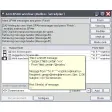
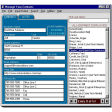
ErgoNote organizes notes in a tree-like structure which makes them easier to handle. The program also features an embedded search tool to find notes, a wide collection of icons to identify each note, an encrypting tool and support for alarms, though this last feature only works if you name your tasks following an "alarm node pattern" I was unable to find anywhere – not even in the program's documentation.
What's more, if you have a Pocket PC you can use the Pocket version of ErgoNotes on it as well, synchronizing data between your desktop and your device and making the program even more useful.
With ErgoNotes you can organize your life in a more productive way, especially if you also have a Pocket PC and sync data between your desktop and your device.

























User reviews about ErgoNotes
Have you tried ErgoNotes? Be the first to leave your opinion!